SnapLinkr Logo

SnapLinkr

Dynamic Contact Ecosystem

✦ AI OCR Contact Reader

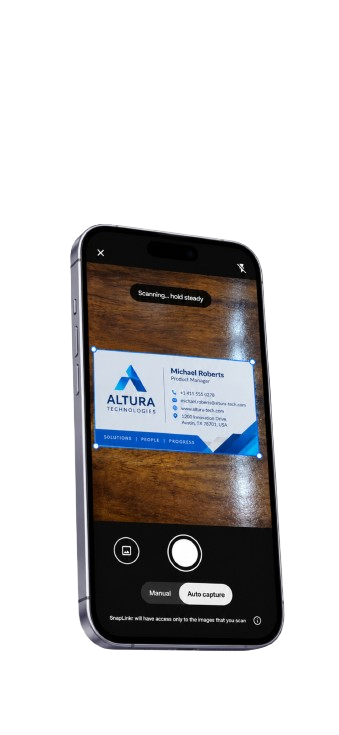
AI Business Card Scanner & Real-Time OCR

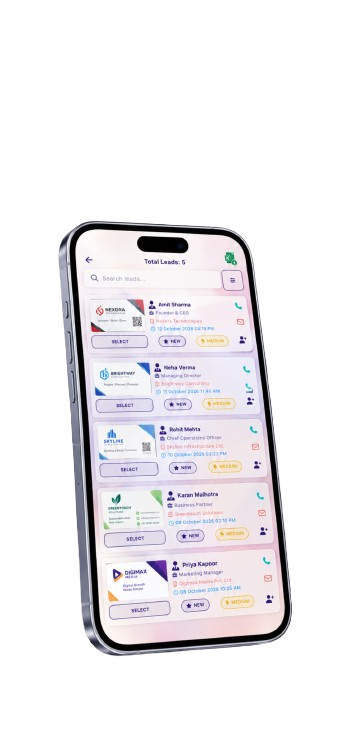
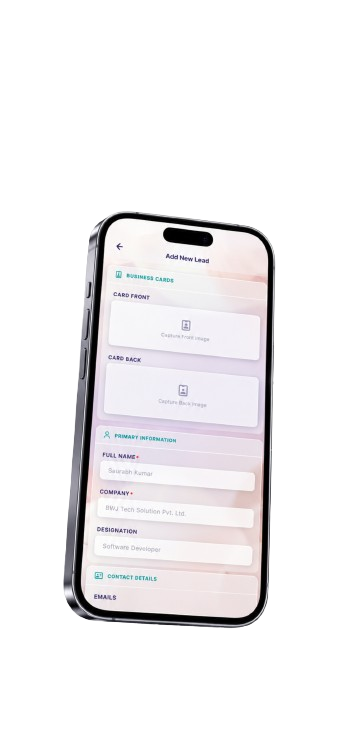
Seamlessly scan paper business cards and convert details into clean digital records. Train, segment, and parse contact data locally using advanced neural networks, ready to sync directly to your CRM.

Interactive Sweep

AI Scanning Sweep Simulator

Scan a mock business card to see character segment overlays. Choose different languages from the list below to change card values dynamically.

Gregory Harrison

Chief Financial Officer

Hedge Mutual
πŸ“ž +44 20 7946 0958 πŸ“§ g.harrison@hedgemutual.com πŸ“ 12 London Wall, EC2M 5QD
CRM Sync Target 99.8% OCR MATCH

Parsed CRM Dashboard

Structured values extracted instantly on scanning. Complete accuracy validations.

First Name β€”
Last Name β€”
Job Title β€”
Organization β€”
Phone Connection β€”
Email Target β€”
Neural Performance

OCR Telemetry

Live metrics captured during neural character classification sweep.

Segmentation Speed 0ms
⚑ Sub-Second Speeds

780ms

Our advanced edge neural-net parses text, checks spelling, and exports files under 800 milliseconds.

🎯 Fields Verified

99.8%

Algorithmic spell checks cross-reference postal, email, and domain systems to guarantee data purity.

🌍 Global Standard

Languages Engine

Select card layouts in English, Spanish, German, French, or Japanese.

Integrations Network

Automated Contact Sync Pipelines

Track live API webhook sync steps after the laser completes its OCR sweep.

β—† HubSpot CRM Idle
β–  Outlook Contacts Idle
● Google Contacts Idle
[System] Ready to scan contacts...
β˜… Detailed Systems Specifications

Deep Tech Specs: Business Card OCR Engine

Behind the user interface is a sophisticated optical recognition framework tailored for modern sales professionals and teams. Explore how we ensure accuracy, speed, and cross-platform integrations.

Advanced Neural Text Layout Mapping

Traditional OCR engines struggle with modern creative layouts. Linear, vertical, off-centered, and high-contrast business cards often result in chaotic parsed strings. SnapLinkr's OCR scanning engine utilizes a localized layout segmenter. When a scan is initiated, the system divides the paper card image into multiple structural quadrants, scanning for text clustering density.

By defining bounding box matrices, the scanner identifies contact segments based on key identifier characters. Telephone numbers are parsed by matching international numeric standards (such as country codes and area codes). Email addresses are isolated by detecting localized "@" strings and validating them against live DNS systems to confirm mailbox availability. Job titles are mapped using a curated corporate hierarchical dictionary with thousands of index markers ranging from administrative roles to C-suite executive posts.

On-Device Privacy & Neural Net Processing

Data security is paramount when handling enterprise contact directories. SnapLinkr employs a hybrid execution model. Whenever a user scans a business card via our mobile app, the primary character segmentation and image alignment occur directly on the client device using lightweight WebAssembly (WASM) neural networks.

By executing neural segmentation processes client-side, sensitive personal data is protected from intercept threats during network transfers. Only the finalized, localized segments are transmitted via encrypted endpoints to our secondary API cluster for final database mapping. This secure workflow ensures compliance with GDPR and corporate privacy protocols, giving you peace of mind that scanned details remain isolated and private.

Spell-Check Algorithms & Postal Validations

Character recognition is rarely 100% perfect. Stains, scratches, cursive handwriting, and low-contrast background colors can cause scanner errors (e.g. interpreting a "c" as an "o" or a "1" as an "l"). To address these issues, SnapLinkr integrates a real-time spelling correction layer that cross-references all extracted text with global database indexes.

When an address is extracted, our system queries mapping APIs to cross-verify the street address, city, state, and postal code. If a mismatch is identified (such as a spelling error in a city name), the system automatically updates the entry to the validated postal value. Emails are analyzed to verify if their domains match active MX records, correcting common typing mistakes like "@gmal.com" to "@gmail.com" on the fly.

Real-Time B2B Integrations & Sync Pipelines

A business card reader is only useful if it flows smoothly into your marketing stack. SnapLinkr's automated integration pipeline maps parsed data fields into standard JSON payloads that match modern B2B endpoints.

Whether your team relies on Salesforce, HubSpot, Zoho, Microsoft Outlook, Google Contacts, or custom CRM solutions via Zapier webhooks, SnapLinkr updates directories instantly. Leads are qualified based on their company size and job titles, triggering automated email sequences or routing high-value prospects to active sales executives. This ensures that no networking connection is lost, converting paper handshakes into actual deals.

Frequently Asked Questions

Our AI-powered OCR scanning engine achieves a 99.8% accuracy rate on high-contrast cards. We achieve this rate by combining localized text segmentation with automatic spell-checking algorithms that cross-verify company names, emails, domains, and global postal databases. Common scanner mistakes are checked and resolved in milliseconds before the data is written to your dashboard.

Yes, absolutely. By incorporating structural layout detection, the scanner determines whether text flow is horizontal or vertical. In East Asian layouts like Japanese (θ±Žζ›Έ - tate-gaki), the system processes the characters top-to-bottom and right-to-left. This allows for accurate parsing of names, titles, and company details without vertical text lines merging together.

Yes, you can configure your SnapLinkr integrations hub to broadcast parsed contact payloads to multiple platforms at the same time. When a card sweep completes successfully, our webhooks transmit the verified data to HubSpot, Salesforce, Outlook, and other selected CRMs, ensuring your team has unified access to the lead database.

Security is a core pillar of our system. SnapLinkr processes contact details using 256-bit AES encryption both in transit and at rest. Primary character processing occurs locally on your mobile device, reducing external transmission risk. Our APIs also support automated double-opt-in emails, allowing you to ask prospects for consent before adding them to marketing newsletters.

If you prefer not to sync contacts directly to a CRM, you can download lead archives from your SnapLinkr portal as structured CSV spreadsheets or Excel (.xlsx) workbooks. These files are pre-formatted to match default contact import setups for Google Contacts, Outlook, and marketing suites like Mailchimp.

Your Cart

Complete Order Configuration

βœ“

Order Confirmed!

Thank you for your purchase. We are processing your custom laser engraving. Shipping tracking details will be sent within 24 hours.

πŸš€

Launching Soon!

We are putting the final touches on our high-speed AI OCR card scanner and offline lead capture mobile app. Stay tuned!