SnapLinkr Logo

SnapLinkr

Dynamic Contact Ecosystem

Individual / Pro Module

User Features Guide

Master your digital handshake. Learn how to design profiles, map physical NFC devices, manage captured lead groups, and monitor engagement analytics.

Scan Module (Lead Capture)

Capture contact sheets instantly, categorize records into groups, and log call comments on the go.

AI Extraction & Fields

Parse physical cards using high-accuracy optical readers and enrich columns with custom form data.

  • Automated OCR readings for names, numbers, and mails.
  • Custom form builder with dropdown and multi-select.
  • Add notes and priority ratings instantly.

Lead Groups & Filter

Organize contacts into custom event blocks or priority lists, and find information instantly.

  • Move leads in bulk to custom categories.
  • "Uncategorized" safety bucket for new records.
  • Filter sheets by dates, ratings, and groups.

Timeline Follow-Ups

Track interaction history, coordinate tasks, and schedule next follow-up dates.

  • Log interactions as Call, WhatsApp, or Meeting.
  • Status tracker: Proposal, Won, Lost, Contacted.
  • Bulk export databases to Excel file formats.

Tap Module (Digital Profile)

Create responsive professional profiles, style visual attributes, and configure quick share links.

No-Code Profile Editor

Design your custom digital card profile in real-time. Choose your colors, backgrounds, button designs, and typography to fit your individual or business identity. SnapLinkr allows you to showcase all your links, files, and portfolio galleries in one clean interface.

  • Choose from 15 custom Google Fonts.
  • Add profile photos, banners, and logos.
  • Integrate Calendly links, video embeds, and brochures.
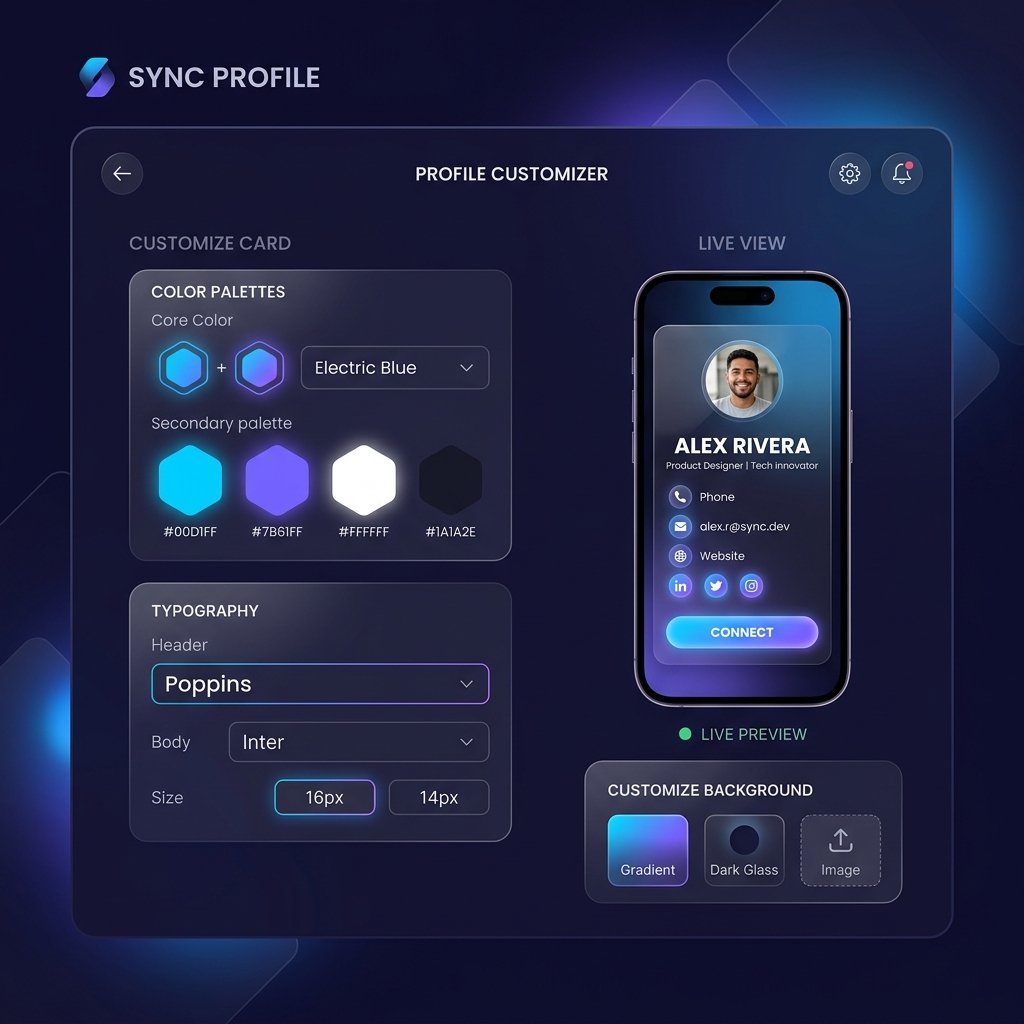
Profile Editor Mockup

Profile Customizer

Showcase designations, bios, company logos, and social media handles in one clean structure.

  • Tappable links to WhatsApp, email, and locations.
  • Supported socials: LinkedIn, YouTube, Behance, GitHub.
  • Instant sync to visitor devices on a tap.

Design Styling Toolkit

Customize fonts, background gradients, button layouts, and shape styles with real-time updates.

  • Choose from 15 custom Google Fonts.
  • Set background colors, theme colors, and font shades.
  • Configure profile photo shapes (Squircle, Circle, Square).

NFC Mapping & Sharing

Connect physical metal/wood cards directly to your digital profiles and configure layout displays.

  • Write profile targets to NFC tags easily.
  • Export custom high-resolution SVG QR codes.
  • Enable direct vCard downloads for phone books.

Rich Content Sections

Add CTA widgets, presentation files, service cards, video players, and product sheets to convert profile visits.

CTA & Service Lists

Direct visitors to target files, calendars, or specific products with call-to-action widgets and grid items.

  • Add up to 3 custom CTA buttons with color overrides.
  • Display 10 product items with photos, descriptions, and pricing.
  • Accept 11 international currencies including USD and INR.

Carousel Galleries & Videos

Showcase portfolios and play product clips directly within user profiles.

  • Embed up to 10 showcase images in a 3D carousel.
  • Embed up to 3 YouTube or Vimeo clips.
  • Play video items directly without page redirects.

File Drawer Downloads

Share brochures, PDFs, design books, or zipped documents from a download block.

  • Upload up to 3 PDF, DOCX, or ZIP files (Max 10MB).
  • Track total download clicks dynamically.
  • Reorder sections dynamically using drag controls.

Profile Settings & Privacy

Manage custom subdomains, toggle indexing rules, protect details, and manage visitor messages.

Privacy & Index Settings

Hide profiles, disable search engine discoveries, and toggle visibility triggers easily.

  • Deactivate public URLs during site edits.
  • Prevent Google and Bing crawl scripts from indexing.
  • Custom metadata optimized for LinkedIn and WhatsApp.

Visitor Inquiries Form

Enable lead capture widgets to receive messages directly from profile visits.

  • Auto-captures location, IP, and ZIP.
  • Instant email notifications for new messages.
  • Filter, verify, and export inquiry records to Excel.

Audit Trails

Review the exact history of modifications made to your profiles.

  • Log details of text updates and image modifications.
  • Access edit log history from a dashboard button.
  • Identify and correct layout changes.

Interaction Tracking & Analytics

Trace user interactions, analyze conversion rates, and read detailed access logs.

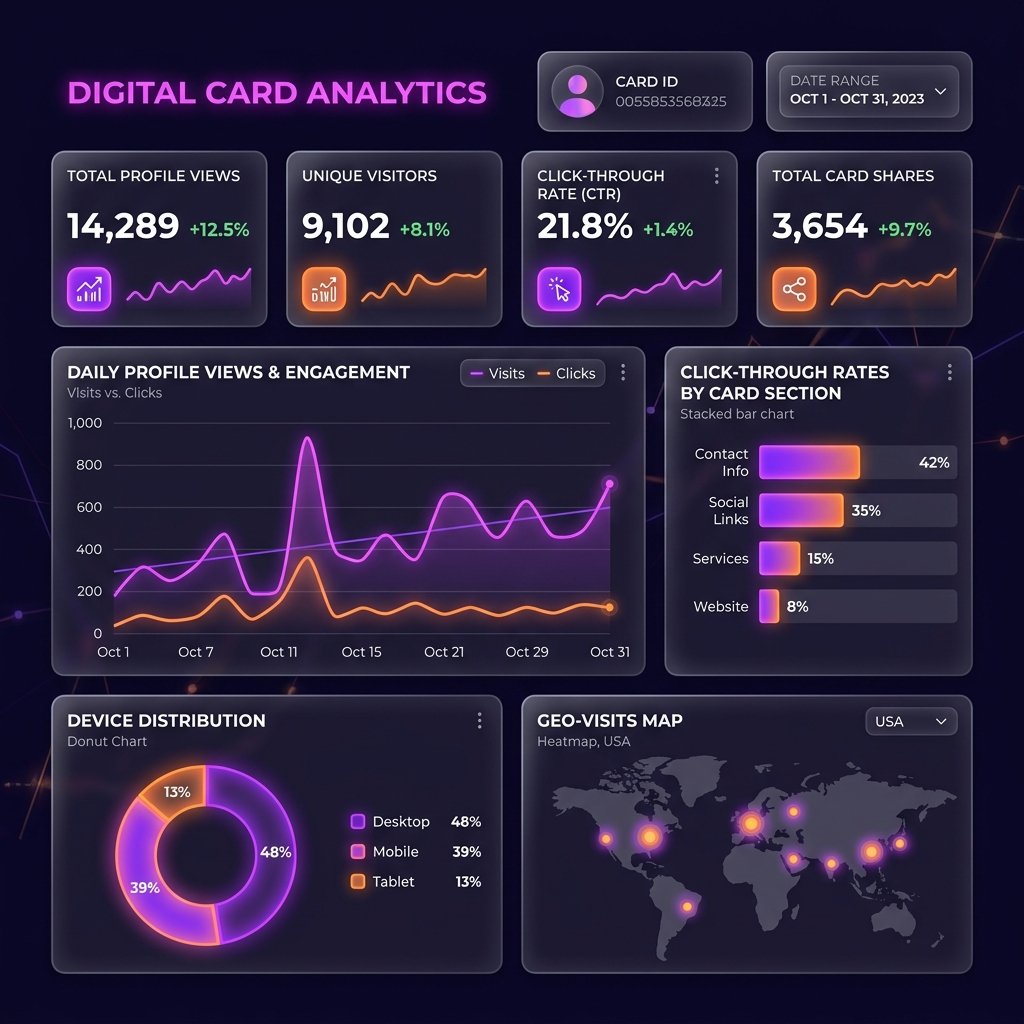
User Analytics Mockup

Engagement Tracking & Analytics

Gather deep, actionable metrics on how visitors interact with your profile. SnapLinkr tracks every button press, social redirect, file download, and video play in real-time, displaying them in a high-fidelity visual dashboard.

  • Real-time count of total visits vs direct contact downloads.
  • Device, browser, platform, and geolocation charts.
  • Downloadable engagement sheets to optimize marketing efforts.

Visual Dashboard

Compare performance charts, track profiles, and monitor conversion metrics.

  • Area charts comparing views vs vCard saves.
  • Pie charts showing browser, device, and OS types.
  • Filter metrics by custom date ranges.

Item-Level Click Stats

Monitor exact action counts for each link, video item, or file download button on your profile.

  • Click numbers mapped per social profile.
  • Video play triggers tracked per title.
  • Download click counts logged per file name.

Real-Time Tap Logs

Search access logs containing visitor metadata like screen resolutions, battery state, and IP details.

  • Capture connection types (4G/WiFi) and battery levels.
  • Log referrer links to identify traffic sources.
  • Export searchable tap records to Excel spreadsheets.

Account Operations & Help

Manage account settings, track active sessions, verify security levels, and get support.

Account Subscriptions

Manage subscription details, trace expiry dates, and renew licenses.

  • Track Basic vs Pro plan status.
  • Direct links to renew or upgrade plans.
  • Pro benefits: Custom domains and priority queues.

Active Device Control

Monitor active connections to ensure security and prevent unauthorized access.

  • IP, OS, and location snapshots per session.
  • One-click remote session termination.
  • Warning flags for suspicious login locations.

Support & Updates

Submit bug requests, monitor support tickets, and view updates from a unified sidebar drawer.

  • Submit support tickets directly from pages.
  • Changelog updates listing new tools.
  • Direct support links for Pro subscribers.

Upgrade to SnapLinkr Pro Today

Get custom domains, analytics, file sharing, and video embeds for your digital business card.

Your Cart

Complete Order Configuration

Order Confirmed!

Thank you for your purchase. We are processing your custom laser engraving. Shipping tracking details will be sent within 24 hours.

🚀

Launching Soon!

We are putting the final touches on our high-speed AI OCR card scanner and offline lead capture mobile app. Stay tuned!